Alteo is an online store for home appliances, TVs, computers, phones and household equipment. The site was built with Bricks Builder and worked well, but it was slow: on mobile, PageSpeed gave it 44 to 64 points, and the server spent more than three seconds on every category page. This article describes how we moved the whole site to DJIA Builder, step by step, and what the measurements showed afterwards.
Starting point: a large store on Bricks
At the time of the move, Alteo had more than 25,000 products for sale and over 700 filters and categories: 324 categories and 404 attributes a shopper can filter by, such as brand, price, colour, capacity and energy class. Filtering ran on WP Grid Builder, and the layout on Bricks templates.
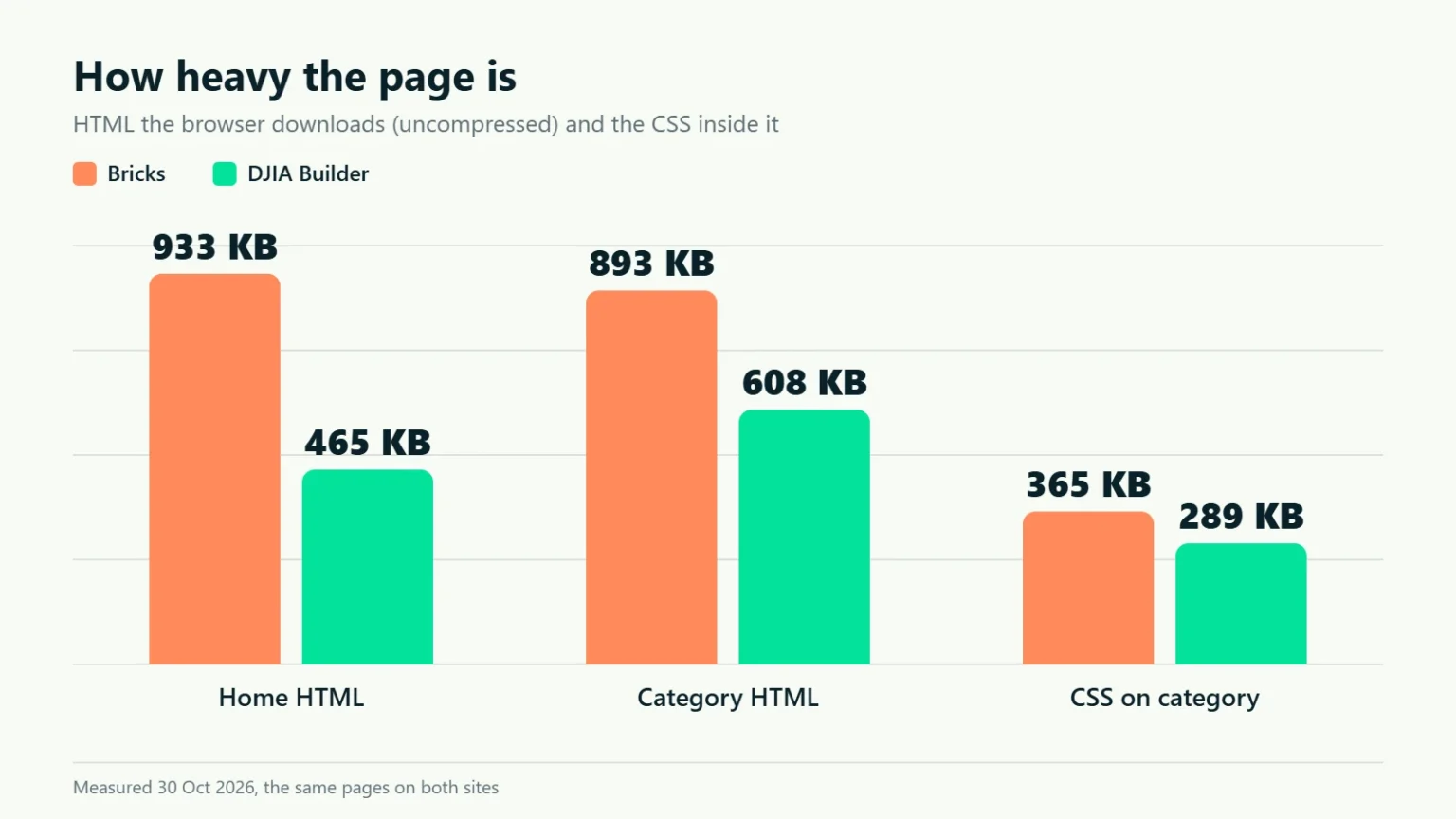
In a store like this, speed does not depend on one image or one plugin. Every category page carried about 900 KB of HTML, more than 350 KB of which was CSS embedded in the page itself. The server took 2.6 to 3.4 seconds to build that page before the browser could start showing it.

How the site was moved, step by step
The goal was that shoppers would notice nothing except the speed. Page URLs, products, cart, checkout and customer accounts stayed the same. The new version was built on a copy of the site, on the same server, with the same database and the same products, while shoppers kept using the Bricks version. Only the way the pages are built changed.
1. Import from Bricks
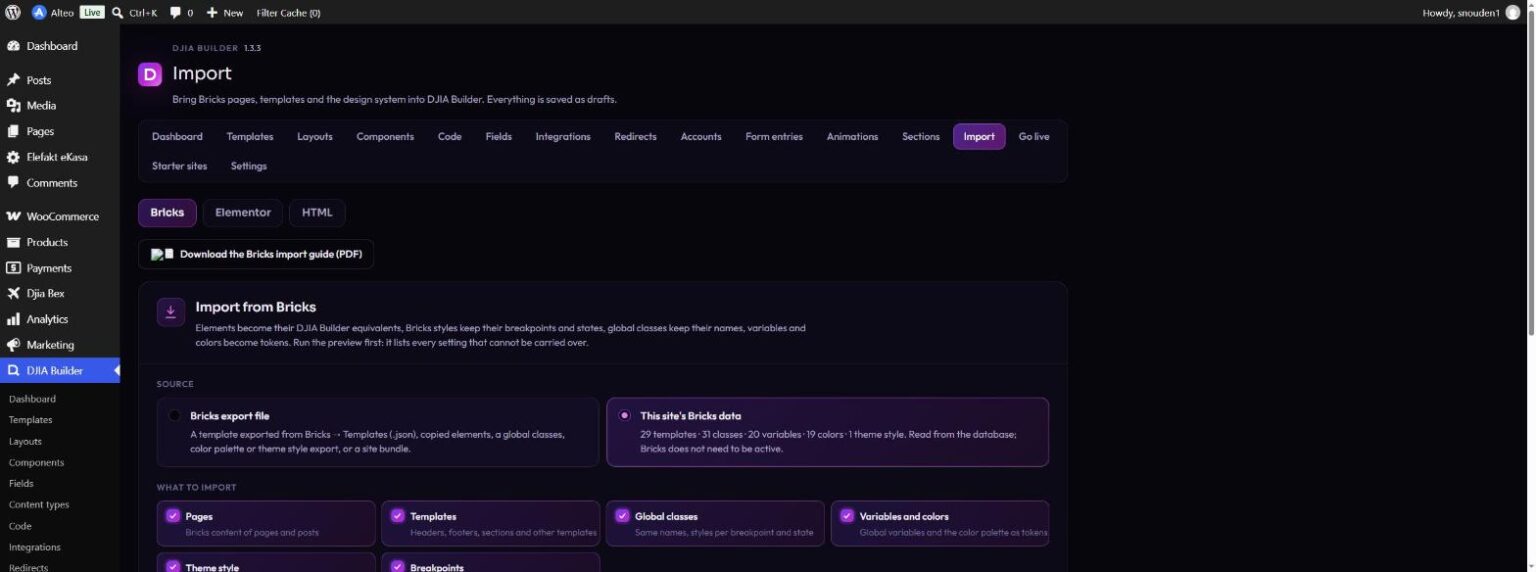
DJIA Builder has a built-in Bricks import. It reads the Bricks data straight from the database, so Bricks does not even need to be active. On Alteo it found 29 templates, 31 global classes, 20 variables, 19 colours and one theme style. Before importing it shows a preview listing every setting it cannot carry over, and everything it imports is saved as a draft, so nothing goes live unchecked.
2. The design system stays the same
Every Bricks element becomes its DJIA equivalent. Global classes keep the same names and the same styles per screen width and state, such as hover, and variables and colours become tokens. That is why the design was almost identical right after the import, and we only had to fine-tune details by hand.
3. Header and footer as layouts
The header and footer became layouts with the condition “entire site”. They are not repeated on every page; they are built once and apply everywhere. The header, with the menu of every category, search, mini cart and wishlist, has 689 elements.
4. A template for every page type
The site has 32 templates: shop, main categories, subcategories split into groups, product, search results, cart, checkout, order confirmation, the 404 page and 11 templates for the customer account, from login to the wishlist. Each template has a condition for where it applies. For example, the subcategories of Home appliances and Home & living use their own template, tied to those categories.
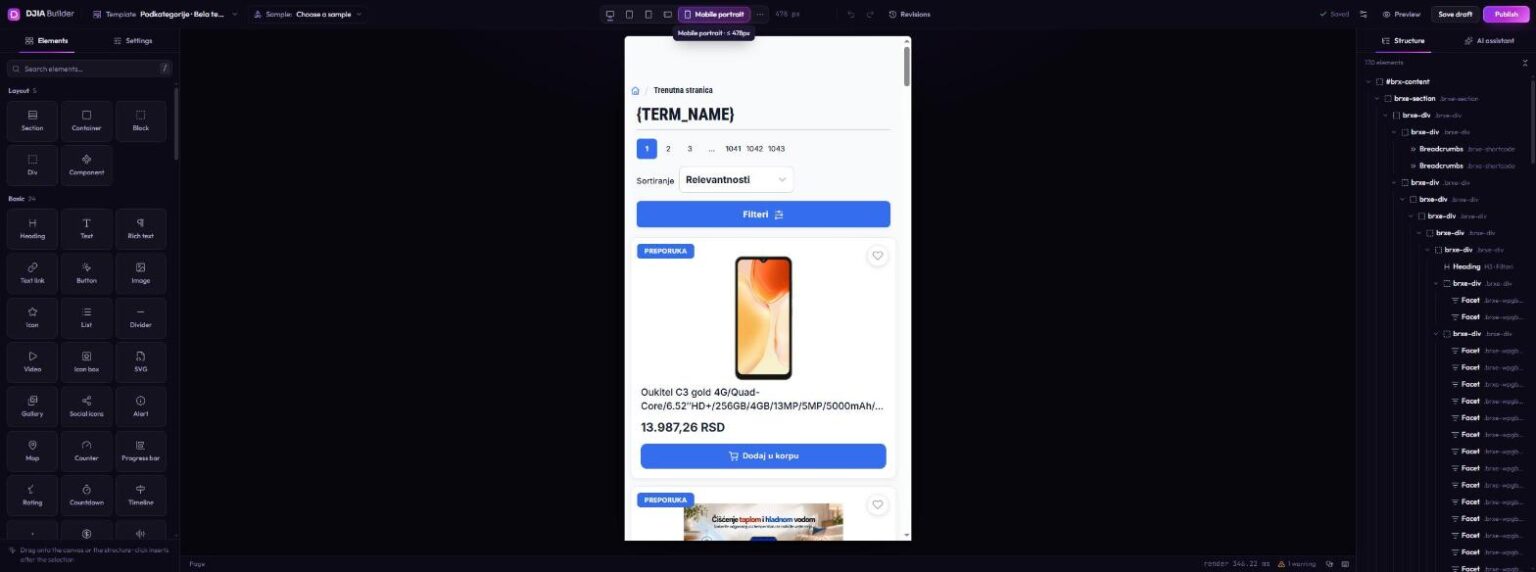
Every template is also edited for phones. The editor has desktop, tablet and phone views, and styles are set separately for each width.
5. All code in one place
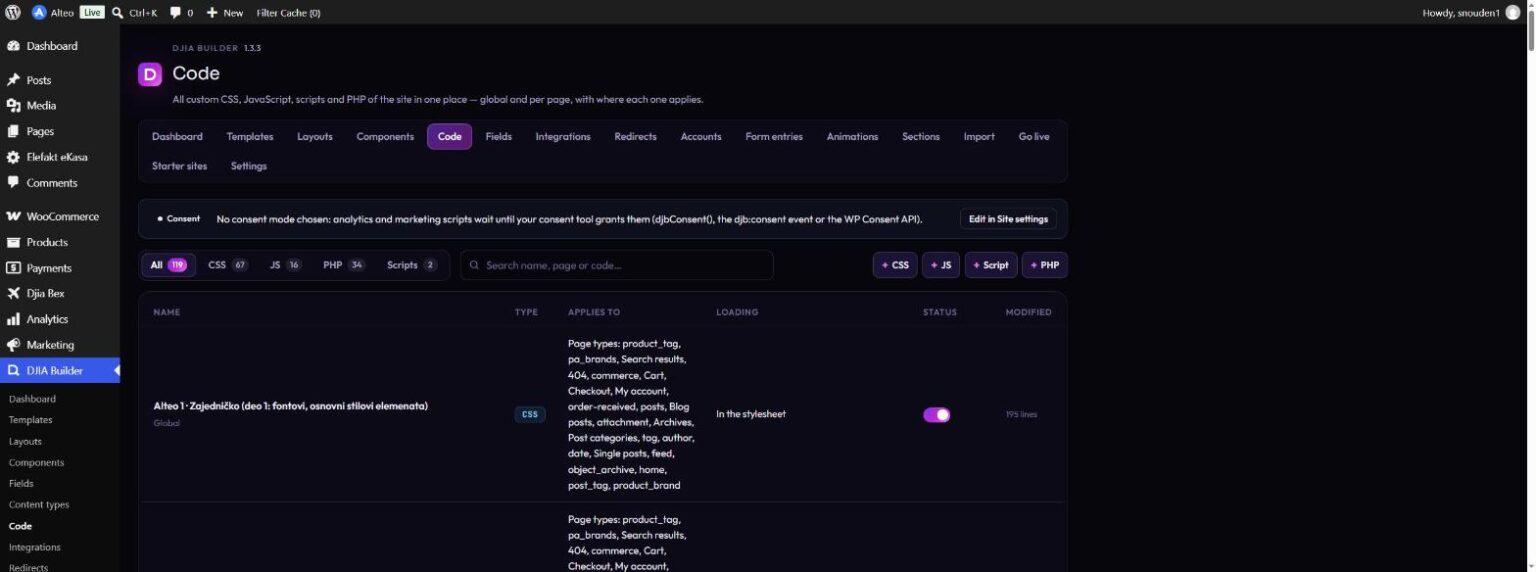
The import does not carry over hand-written code, so we moved the CSS, JavaScript and PHP from Bricks and the theme into the Code section. There are now 119 items: 67 CSS, 16 JavaScript, 34 PHP and 2 scripts. Each one says where it applies: the whole site, one page type or one template.
6. No Code element on the page
The rule was that every part of a page is a native DJIA element: heading, text, image, button, product list, filter. There is no block of hand-pasted HTML anywhere. That keeps everything editable in the editor, and the builder knows exactly what is on a page and loads only what it uses.
7. WooCommerce and plugins stay
Products, orders, customers, payment methods and shipping remained the same WooCommerce data and the same plugins. The DJIA templates simply display them with different, lighter elements.
8. A 1:1 check before the switch
After every step we compared the page with the original at 26 screen widths, from phone to large monitor, as a guest and as a logged-in customer. We also checked states such as an open menu, search, the mini cart and filters. A template was published only when there was no visual difference.
Piece by piece: templates in DJIA Builder
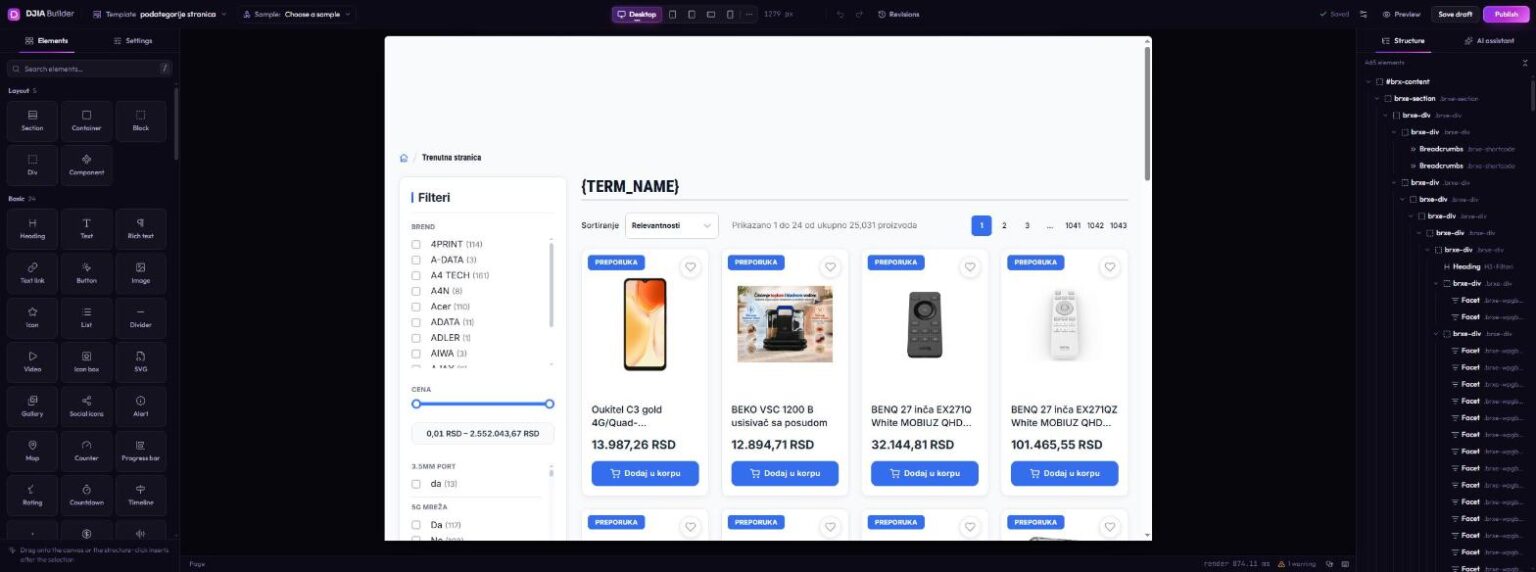
A store with 25,000 products is not built page by page. You build a few templates and WooCommerce fills them with data. The category template took the most work, because it shows the filters, sorting, pagination and the product card.
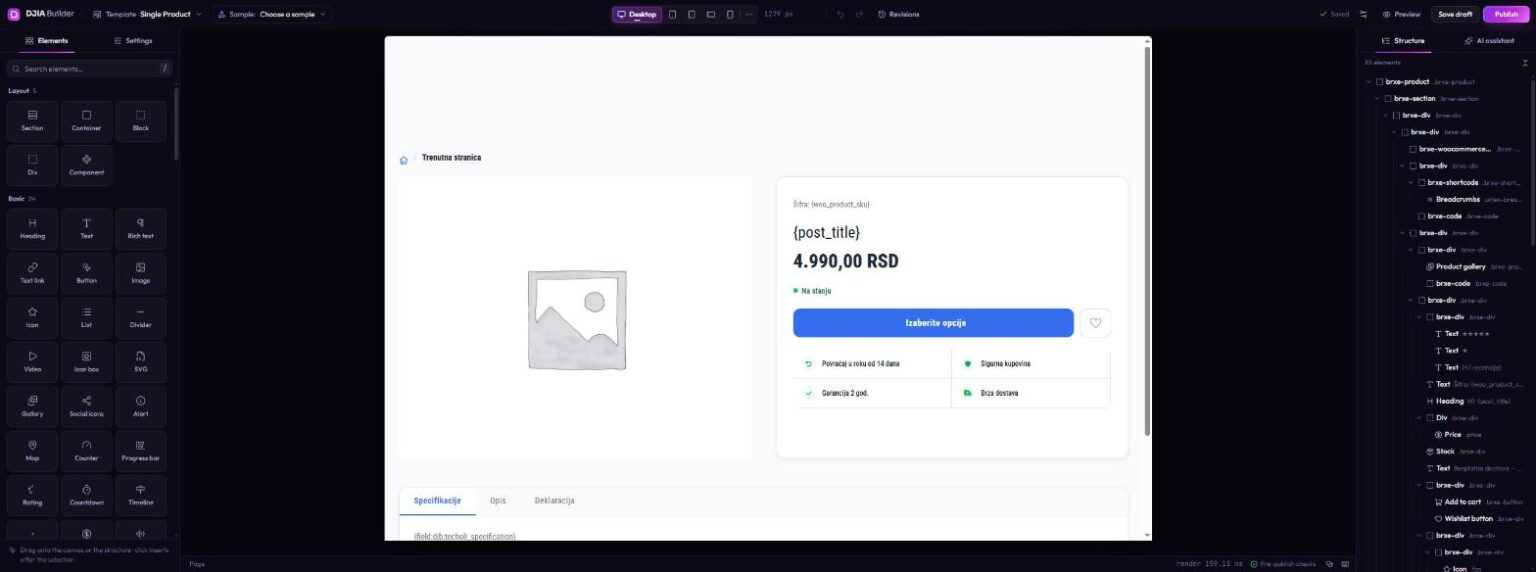
The product template uses dynamic tags. Instead of a real title the editor shows {post_title}, instead of the SKU {woo_product_sku}, while price, stock, gallery and the specification tabs come from WooCommerce.
Filters for 400+ attributes
We built the filters with DJIA catalogue elements. Brand, price and attributes apply instantly, without an “Apply” button, and the chosen filter is written into the page URL, for example ?brands=beko. A filtered list can be shared as a link, and search engines see it as a real page.

We timed a click on BEKO in the Washing machines category. The list changed from 212 to 61 products in 0.33 seconds, from the click to the new cards on screen. The server answered in 0.09 to 0.17 seconds and sent about 13 KB of data, even when the response was not cached.
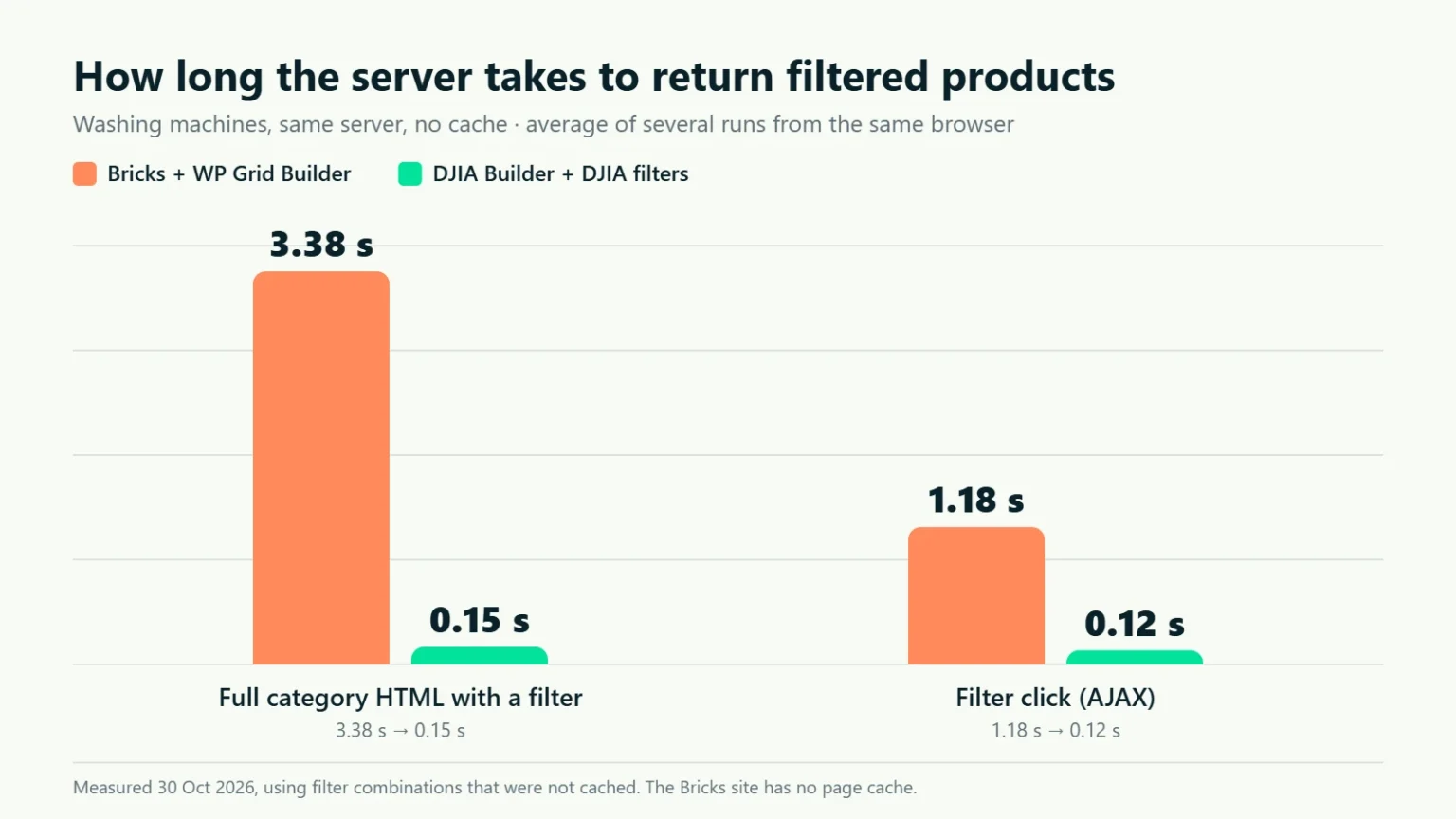
Our first measurement fooled us: WP Grid Builder answered in 0.17 s, but from its cache. When we picked filter combinations nobody had requested before, the Bricks version answered in 0.7 to 1.7 seconds, 1.18 s on average. DJIA filters answered the same combinations in 0.09 to 0.17 seconds, 0.12 s on average, about ten times faster. And when a shopper opens a category, arrives from Google or reloads the page, the Bricks version has to build the whole HTML again, which takes more than three seconds.
Less CSS on every page
On the Bricks version every page carried the CSS of all templates at once. In DJIA Builder we split the CSS by template group: regular pages, product, and categories with the shop. Each page gets only the rules it actually uses.
Before publishing, every group was checked three ways: as a guest, as a logged-in customer and before JavaScript loads. We also checked 60 states such as an open filter, sorting, the mini cart, the menu and search, on desktop and phone. Every check had to show zero visual differences.
Search, cart and checkout
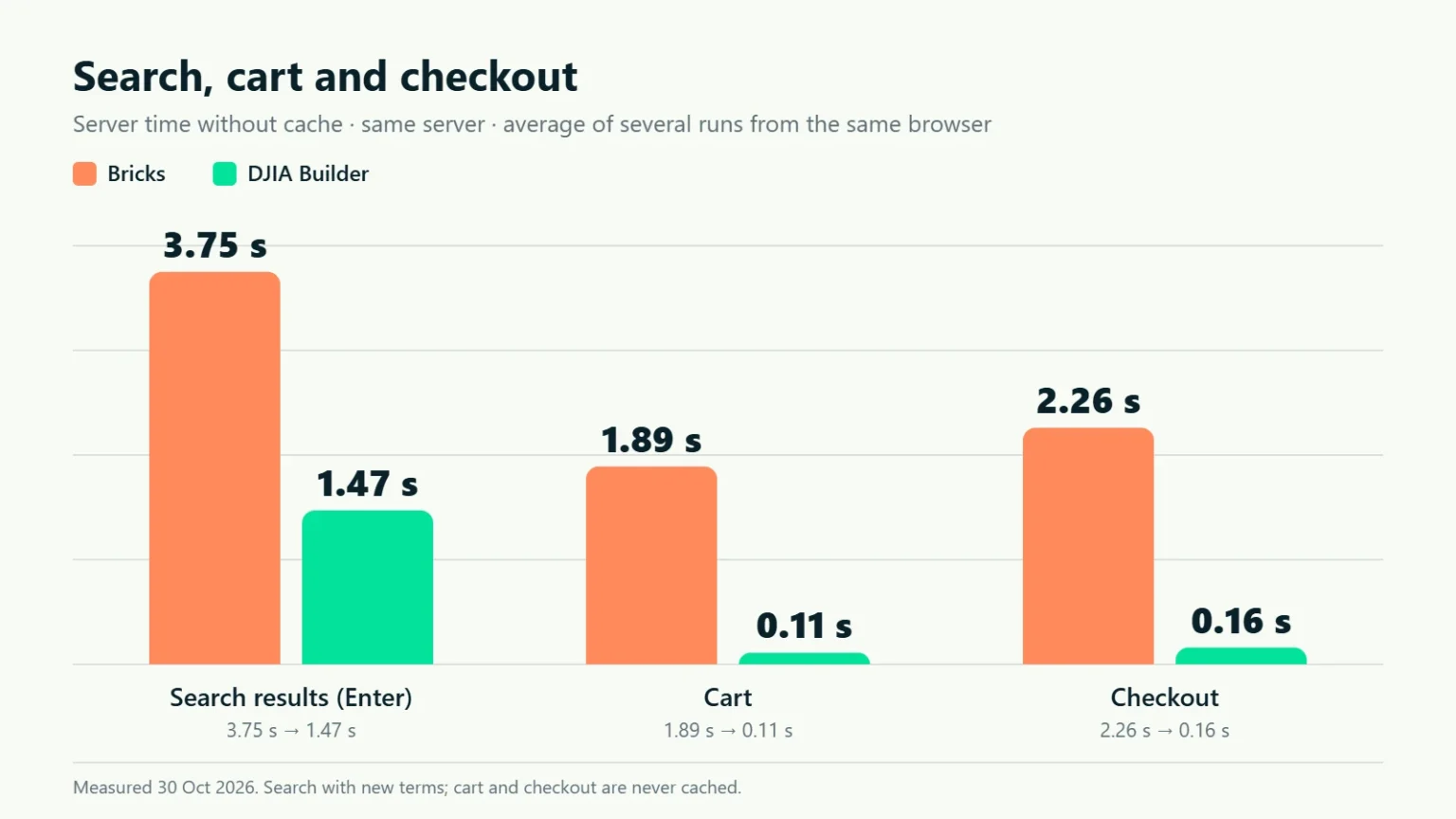
We also measured the pages where shoppers actually buy, again without cache and on the same server. Search results, when a shopper types a term and presses Enter, arrive in 1.47 s instead of 3.75 s. The cart opens in 0.11 s instead of 1.89 s, and checkout in 0.16 s instead of 2.26 s. Cart and checkout are never cached, so this is pure server time.
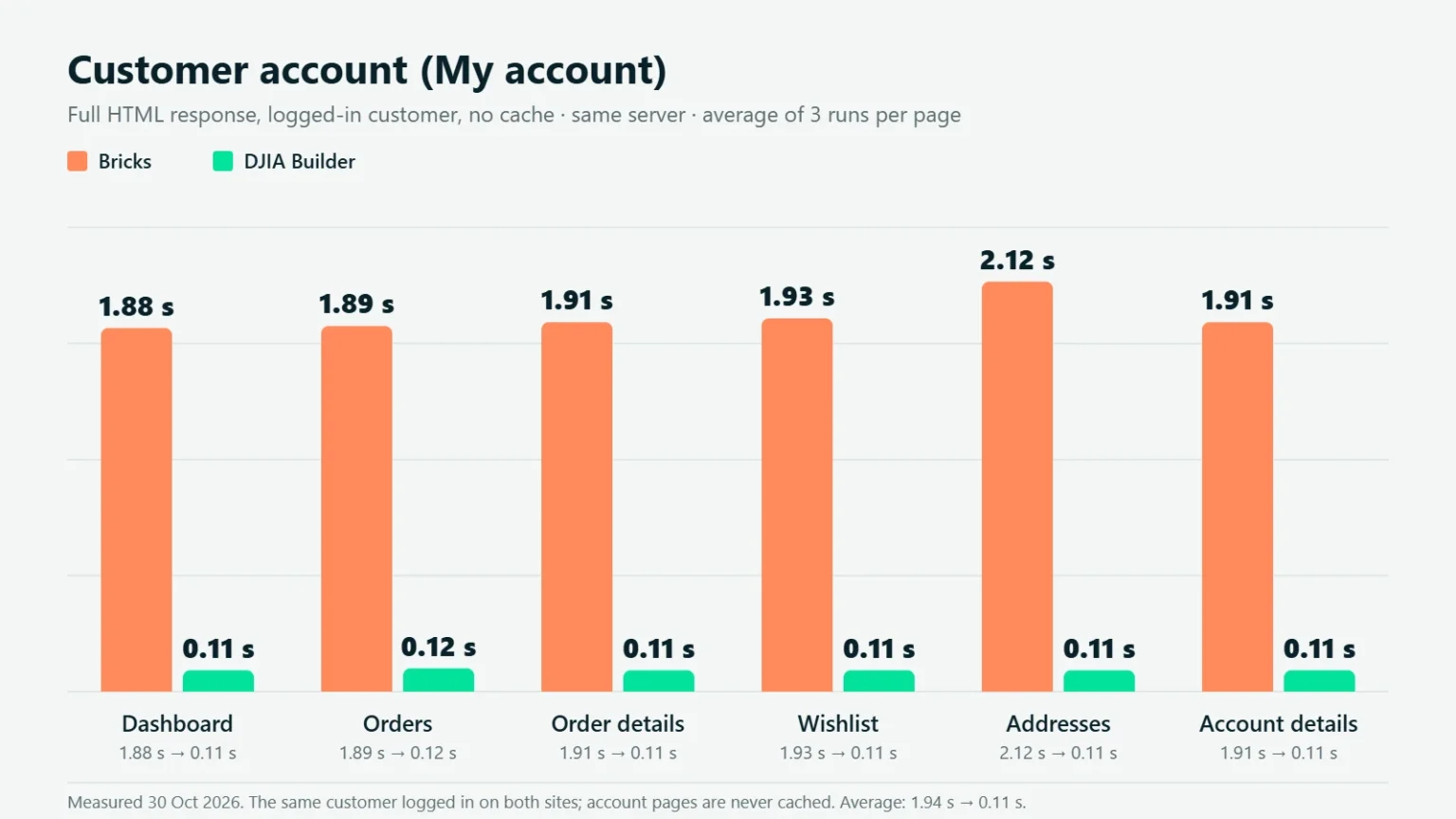
The same goes for the customer account. We were logged in as the same customer on both sites and opened the same account pages: the dashboard, orders, a single order, the wishlist, addresses and account details. These pages are never cached because they are personal to each customer, so they show the raw server speed. On Bricks every account page took about 1.9 s (1.94 s on average); on DJIA Builder it took about 0.11 s, roughly 17 times faster.
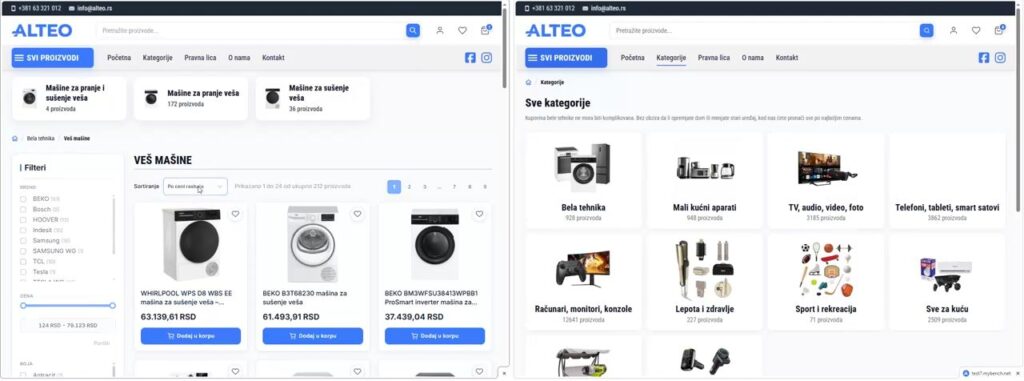
In the video below both sites are open side by side, on the same server and at the same time: on the left Alteo on Bricks (alteo.rs), on the right the same store on DJIA Builder. We go through the same pages in the same order: home, all categories, a product page, a category with filters, the cart, the customer account, the wishlist and search.
Load test: 10, 25 and 50 shoppers at the same time
Finally, we checked how the sites behave when many shoppers use them at once. We ran the test in Grafana Cloud k6 from servers in Frankfurt. Every virtual shopper follows the same path as a real one: home page, one of eight categories, one to three filter clicks in Washing machines, a product, a search, adding to the cart and the cart. Filters send the same request the browser sends, and every round starts with an empty cart. We raised the number of shoppers in three steps: 10, 25 and 50, three minutes each.
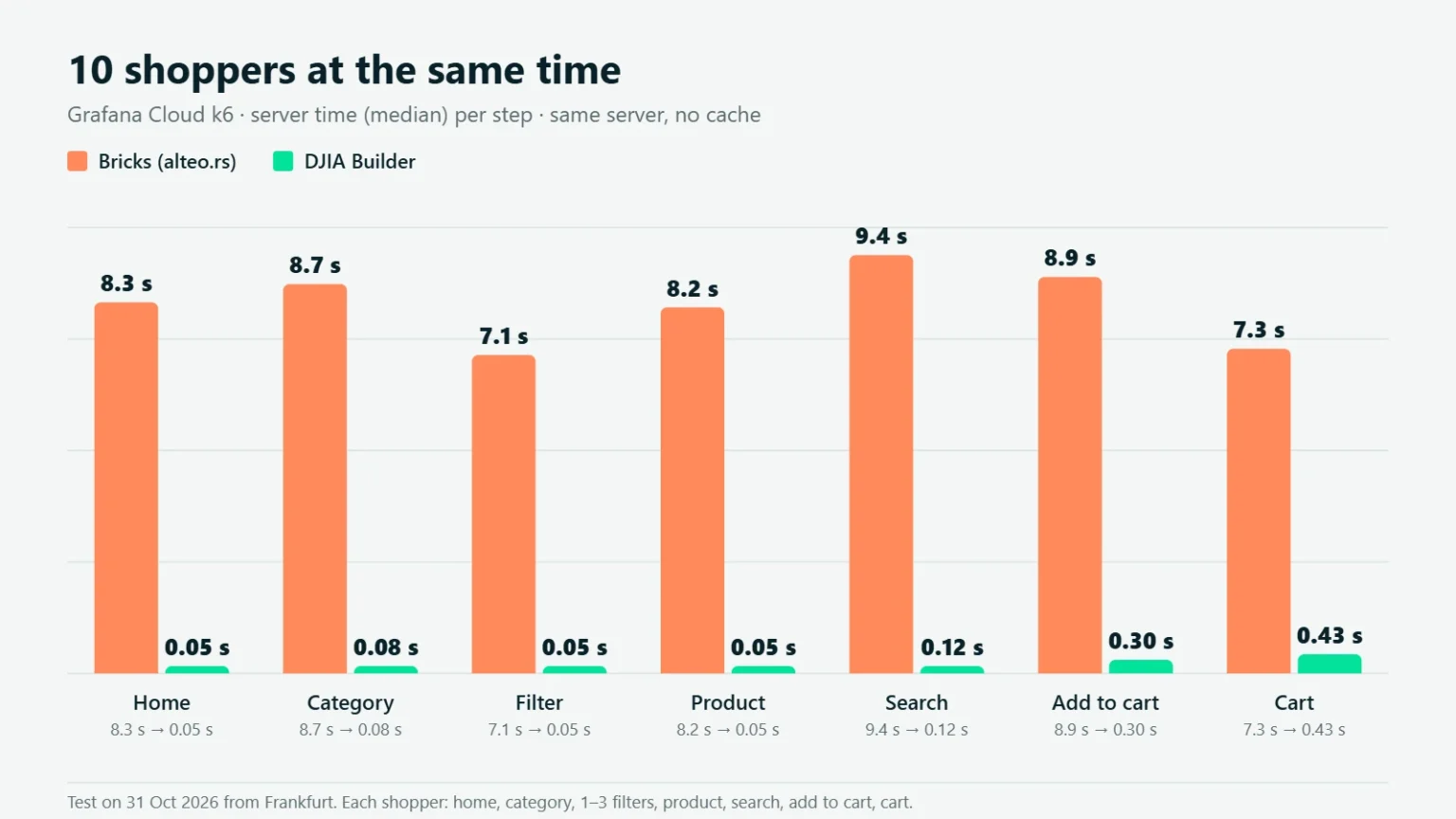
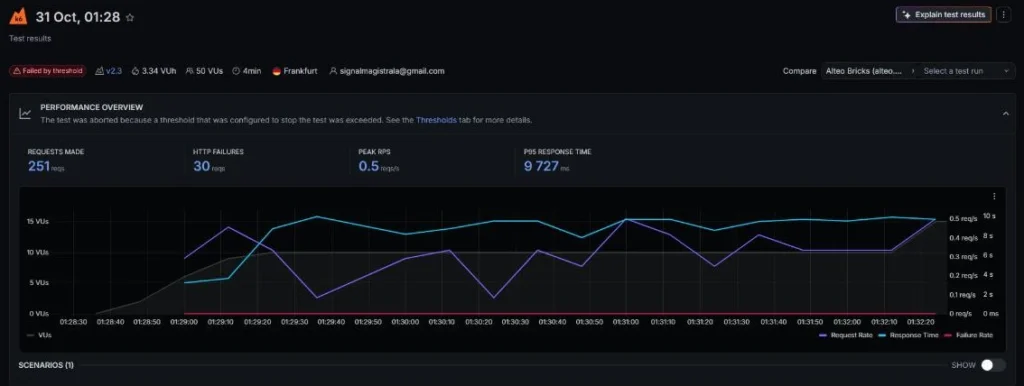
The DJIA version passed all three steps without a single error: 7,662 requests, with 95% of responses in under 0.47 s. With 50 shoppers the pages answered just as fast as with 10: the home page in about 0.04 s, a category in 0.07 s, a filter click in 0.04 s, adding to the cart in 0.30 s and the cart in 0.42 s.
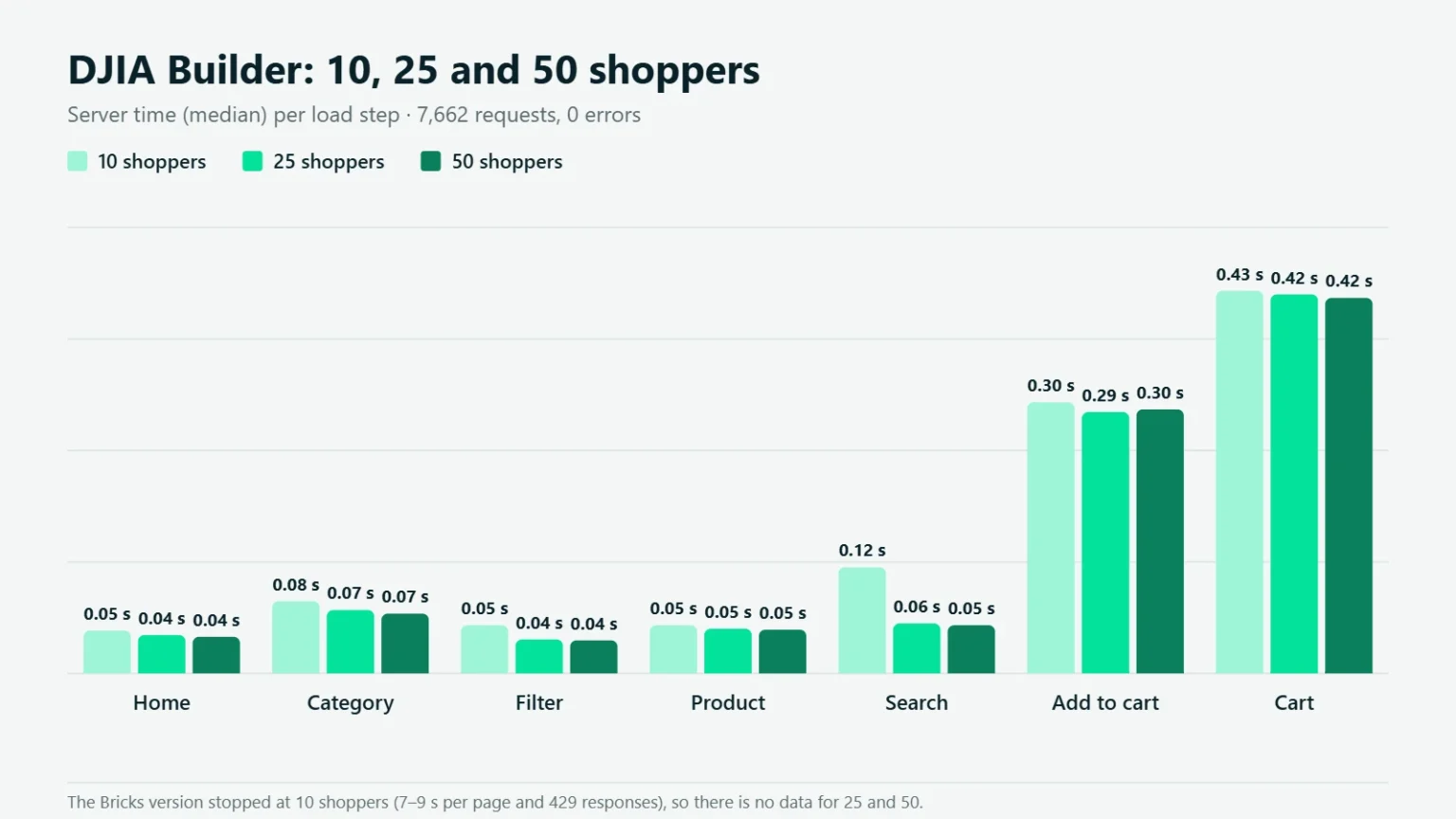
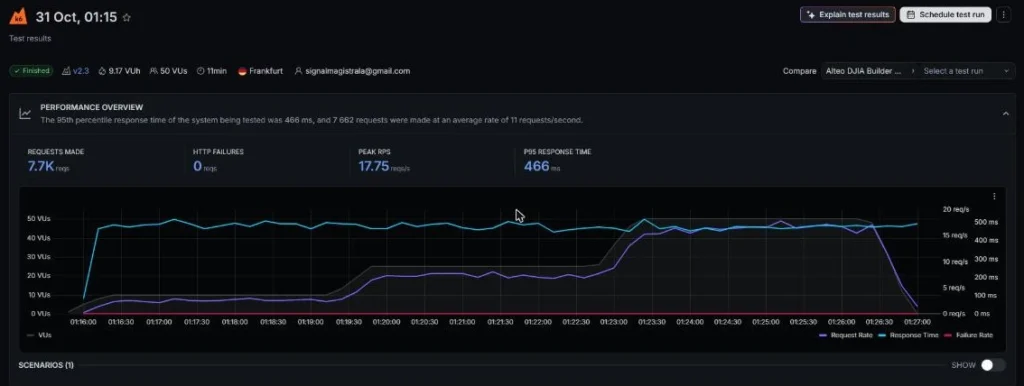
The Bricks version slowed down to 7 to 9 seconds per page with just 10 shoppers, although a single shopper gets the same page in 2 to 3 seconds. After four minutes some requests got a 429 (too many requests) response, so the test stopped itself before the 25 and 50 shopper steps. For Bricks we therefore show only the 10 shopper step.
PageSpeed: before and after
We measured both versions of the site within the same hour, on PageSpeed Insights, for the same three page types.
| Page | Bricks, mobile | DJIA, mobile | Bricks, desktop | DJIA, desktop |
|---|---|---|---|---|
| Home | 64 | 95 | 84 | 100 |
| Category | 44 | 96 | 77 | 100 |
| Product | 53 | 91 | — | — |
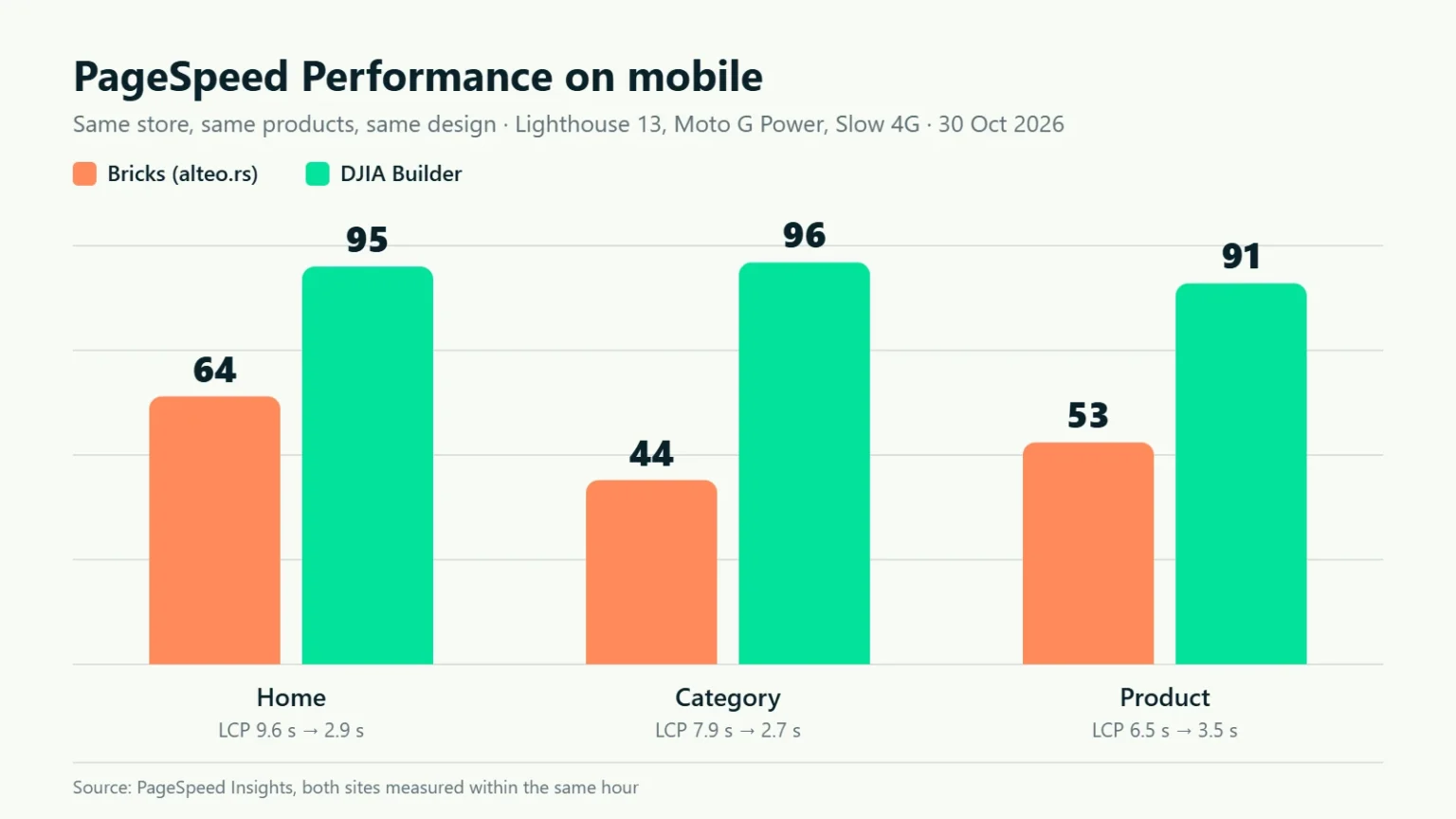
The other scores improved too. On the DJIA version accessibility, best practices and SEO score 100 on the home and category pages, while the Bricks version scored 83 to 92.
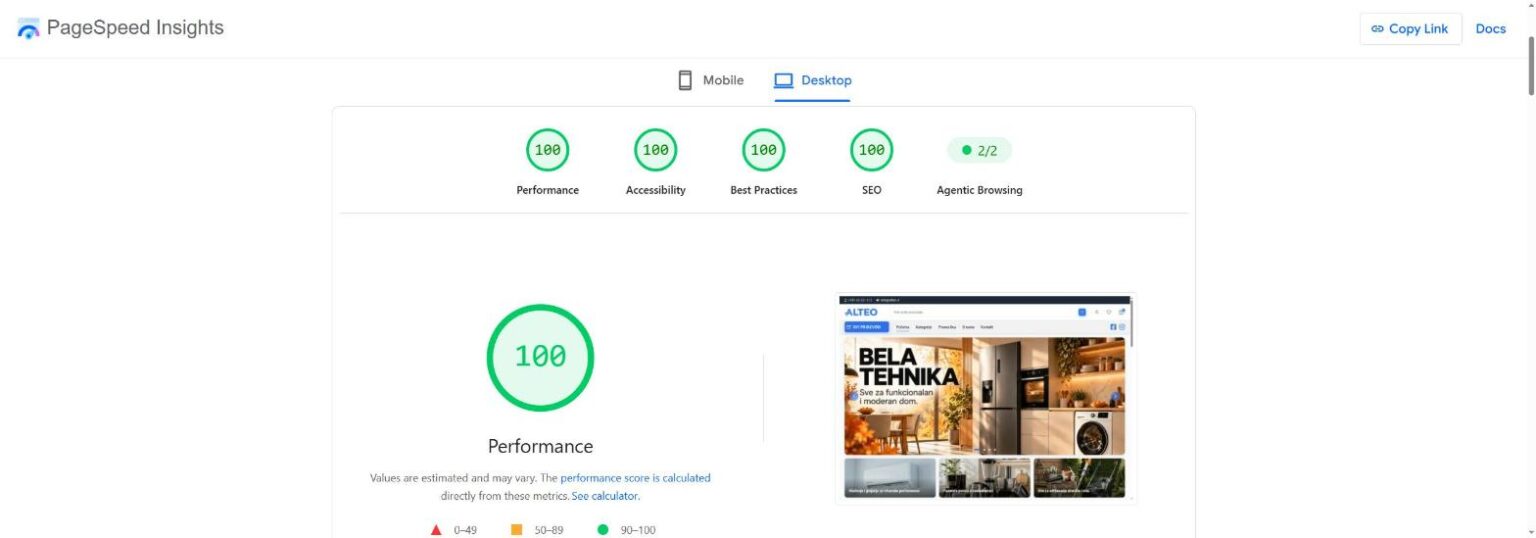
How we measured
We ran PageSpeed for both sites a few minutes apart. Server time and page size were measured from the same browser, several times in a row, and we report the average. A single PageSpeed run can vary by a few points, so read the numbers as a direction rather than an exact value.
Both versions run on the same server, with the same database and the same products. Only the builder and the filters differ. We measured both sites without cache. Server time was measured on pages with a filter in the URL, on filter combinations nobody had requested before, on search results, in the cart, at checkout and in the customer account. None of these pages is served from cache on either Bricks or DJIA Builder, so the numbers show how fast each builder really builds the page.
What made the difference
- Lighter HTML. The same design produces a home page half the size.
- A faster page build. On the same server DJIA Builder builds a category page in 0.15 s instead of 3.38 s, without cache.
- Filters in the catalogue. A filter click takes 0.12 s instead of 1.18 s, and a filtered list has its own URL.
- CSS per template. Each page carries only what it uses.
- A check after every step. Shoppers did not notice the move, except for the speed.
Running a large store on Bricks or Elementor? See what DJIA Builder does, or send us your site link. We will measure it and tell you how much faster it can be.